If you’ve been researching headless CMS for business 2026, you’ve probably run into a lot of technical jargon and not nearly enough plain-English explanation. Let’s fix that right now — because this is one of the most important web architecture decisions your business can make this year.
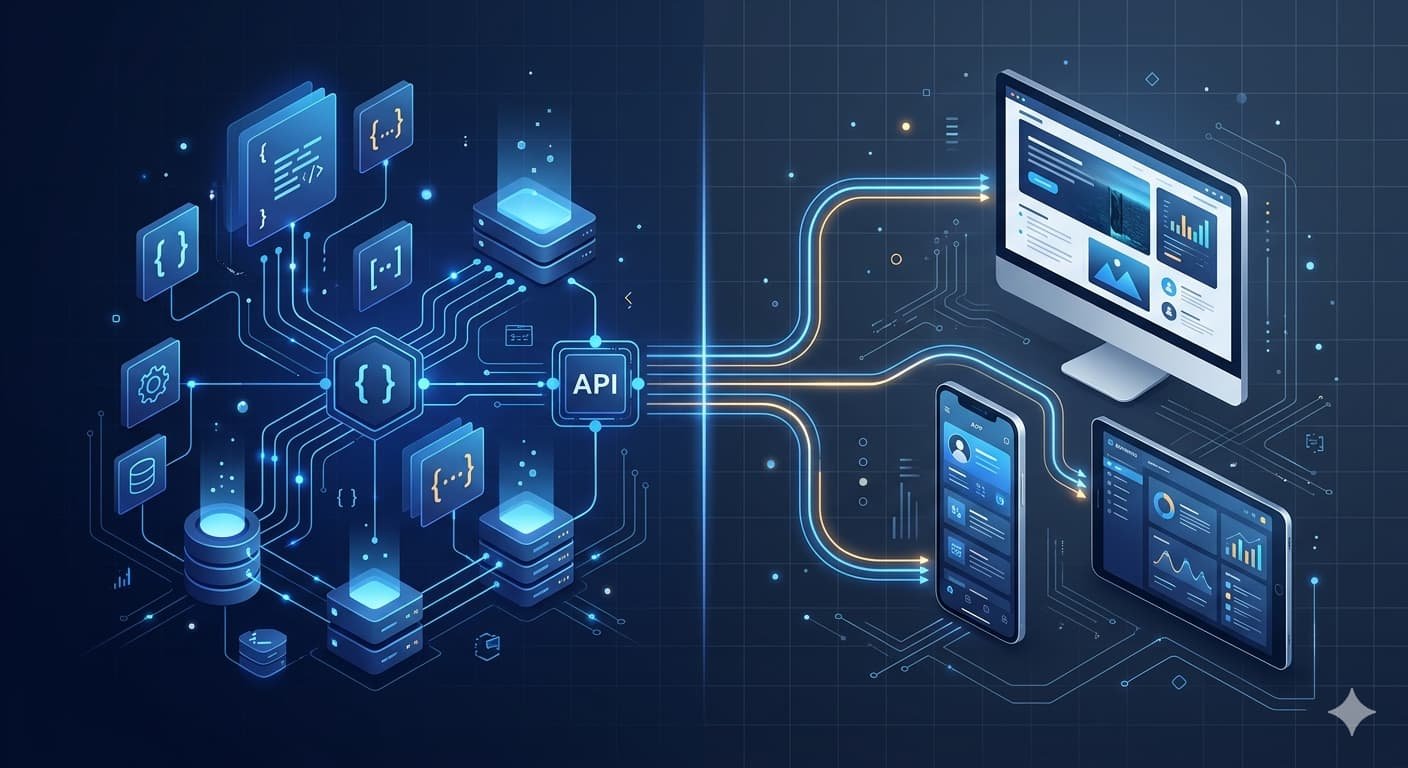
A headless CMS for business 2026 is a content management system that separates the backend (where you store and manage content) from the frontend (how that content is displayed to users). Think of it like a restaurant kitchen versus the dining room. The kitchen prepares everything — the dining room can be redesigned, redecorated, or even duplicated into multiple locations without touching anything in the kitchen.
Why does this matter in 2026? Because businesses today aren’t just publishing content on a single website. They’re pushing content to mobile apps, voice assistants, digital kiosks, smartwatches, and social platforms — all at once. A traditional CMS like WordPress wasn’t built for that world.
How a Headless CMS for Business 2026 Actually Works
In a traditional CMS, the backend and frontend are tightly coupled. WordPress, for example, stores your content and also controls how it’s displayed through themes and page templates. It works great for simple blogs and brochure websites. But when you need that same content to appear on an iOS app, a React-based website, and a third-party platform simultaneously, traditional CMS architecture starts to crack.
A headless CMS for business 2026 delivers content through an API — typically a REST API or GraphQL endpoint. Your development team then uses that API to pull content into whatever frontend they’re building, using whatever technology they prefer: React, Vue, Next.js, Flutter, or anything else.
“According to the Capslock Agency development team, businesses that migrate to a headless CMS architecture see an average 40–60% improvement in page load speed, primarily because frontend developers can implement modern performance frameworks like Next.js without backend constraints.”
The result is a headless CMS for business 2026 setup that’s far more flexible, faster, and scalable than anything a traditional CMS can offer — but it does come with tradeoffs you need to understand before committing.
Headless WordPress vs Contentful: What’s the Real Difference?
This is the comparison almost every US business owner ends up asking about. So let’s break it down clearly.
Headless WordPress means you keep WordPress as your content backend but strip away its frontend entirely. You use the WordPress REST API or WPGraphQL to serve content to a custom-built frontend. Your editors still use the familiar WordPress dashboard. Your developers build the frontend in whatever framework they choose.
Contentful, on the other hand, is a purpose-built headless CMS. There’s no legacy frontend at all — it was designed from day one to be API-first. The content modeling is more structured and developer-friendly, but there’s a steeper learning curve for non-technical content teams.
| Feature | Headless WordPress | Contentful |
|---|---|---|
| Content editor familiarity | High (standard WP dashboard) | Medium (custom UI) |
| API flexibility | Good (REST + GraphQL via plugin) | Excellent (native REST + GraphQL) |
| Pricing | Free (self-hosted) + hosting costs | Free tier, paid from ~$300/mo |
| Developer experience | Moderate | Very high |
| Plugin ecosystem | Extensive | Limited |
| Ideal for | Existing WP users, SMBs | Enterprise, multi-platform teams |
| Custom content modeling | Possible but limited | Native and powerful |
| Scalability | Moderate to high | Very high |
The honest answer? Headless WordPress vs Contentful isn’t a question of which is better — it’s a question of what your team can maintain and what your content workflow looks like. A marketing team already using WordPress will struggle with Contentful’s interface. A dev team building for multiple platforms will find Contentful far cleaner to work with.
“According to Capslock Agency’s project experience, small and mid-size US businesses with existing WordPress sites benefit most from a headless WordPress setup, while startups building from scratch with multi-channel ambitions are better served by purpose-built platforms like Contentful or Sanity.”
The Best Headless CMS Options Available in the USA Right Now
Let’s explore the actual platforms worth considering if you’re evaluating the best headless CMS USA options for your business.
Contentful
The most widely adopted enterprise headless CMS globally. It has a polished content modeling system, excellent API documentation, and strong CDN performance. It’s the go-to choice for larger US brands with dedicated dev teams. The pricing scales quickly though — budget carefully if you’re a growing SMB.
Sanity.io
A strong challenger to Contentful, especially popular among US agencies and startups. Sanity’s real-time collaborative editing and highly customizable “Studio” interface make it a developer favorite. The free tier is generous, and it handles structured content beautifully.
Strapi
An open-source headless CMS that you self-host. This makes it hugely attractive for cost-conscious US businesses that want full data ownership. Strapi has a solid admin panel and supports both REST and GraphQL. The tradeoff: you’re responsible for infrastructure and updates.
Headless WordPress (WPEngine / Netlify combo)
Still one of the most practical options for US businesses already running WordPress. Pair it with WPEngine for managed hosting and deploy your frontend on Netlify or Vercel. Your content editors never need to learn a new system, and your developers get full frontend freedom.
Prismic
A mid-market headless CMS with a great visual content slicing model. Prismic is particularly good for marketing sites that need structured, repeatable page sections without requiring a developer for every content update.
When a Headless CMS Makes Sense for Your US Business
Here’s a pro tip: not every business needs a headless CMS for business 2026. The architecture adds complexity, and if your team can’t support that complexity, it can cause more problems than it solves. Let’s look at the scenarios where it genuinely makes sense.
You should consider a headless CMS if:
- You’re publishing content to more than one platform (website + app + other channels)
- Your current CMS is slowing down your website and hurting SEO performance
- You have a development team (in-house or agency) comfortable with modern JavaScript frameworks
- You’re planning significant growth and need a scalable content infrastructure
- You need tight control over performance, security, and custom UI experiences
You probably don’t need one if:
- You’re running a small informational website or blog
- Your team is non-technical and relies on drag-and-drop builders
- Budget is tight and you can’t afford ongoing API-connected development work
- Your content strategy is simple and unlikely to expand to multiple platforms
“The Capslock team consistently advises US clients that a headless CMS is a strategic investment, not a quick fix — businesses should only adopt it when they have the development resources to maintain a decoupled architecture properly.”
What Does It Actually Cost to Go Headless?
Cost is where things get real. Let’s break this down practically.
The platform cost varies widely. Open-source options like Strapi are free to use (though you’ll pay for hosting). Contentful’s free tier covers small projects, but production-grade plans start around $300/month. Sanity’s pricing is usage-based and generally cheaper than Contentful at smaller scales.
The development cost is the bigger factor. Building a custom frontend connected to a headless CMS is not a drag-and-drop project. You’re typically looking at a custom web application, which Capslock Agency prices between $4,000 and $80,000+ depending on complexity. If you’re migrating from an existing WordPress site and keeping WP as the backend, costs are significantly lower — starting from around $2,500–$8,000 for a mid-size business site.
Ongoing maintenance is also worth factoring in. API connections, plugin compatibility, and frontend framework updates need regular attention. Building on a managed web development partnership helps smooth that out considerably.
Headless CMS and SEO: What You Need to Know
One concern we hear often from US business owners exploring headless CMS for business 2026 is whether going headless hurts their SEO. It’s a fair question — and the answer is nuanced.
A headless CMS itself doesn’t affect SEO. But the frontend framework you choose absolutely does. Server-side rendering (SSR) and static site generation (SSG) — available through frameworks like Next.js — are critical if you want Google to crawl and index your content properly. A purely client-side React app with no SSR can absolutely tank your rankings if set up incorrectly.
If you’ve been working on building a website that ranks in Google AI Search 2026, you already know how competitive the landscape has become. A well-architected headless setup with Next.js and a CDN can load pages in under a second — a significant ranking advantage over bloated WordPress themes.
Here’s something many agencies won’t tell you: headless done right is one of the most SEO-friendly architectures available in 2026. But headless done wrong — with poor rendering strategy and no structured data — can destroy your organic traffic.
Real-World Example: A US SaaS Startup Goes Headless
One of the clients the Capslock team worked with recently was a US-based SaaS company running their marketing site on WordPress and their web app on React. The two systems were completely disconnected, their website was slow (3.8 second load time), and updating content required a developer every time.
We migrated their marketing site to a headless WordPress setup — keeping their familiar content editor but rebuilding the frontend in Next.js. The result: load times dropped to under 0.9 seconds, their Lighthouse score jumped from 54 to 91, and their marketing team could now push content updates without touching a developer. Organic traffic increased 38% within four months.
That’s the kind of outcome a well-executed headless CMS migration can produce — but it requires a development team that knows what they’re doing from day one.
Headless CMS vs Traditional CMS: A Quick Comparison
| Factor | Traditional CMS (e.g., WordPress) | Headless CMS |
|---|---|---|
| Frontend flexibility | Limited by themes | Unlimited |
| Multi-channel delivery | Difficult | Native |
| Page load performance | Moderate | Very high |
| Developer freedom | Moderate | Full |
| Non-technical editor UX | Excellent | Varies by platform |
| Setup complexity | Low | High |
| Ongoing maintenance | Low | Moderate to high |
| Cost to build | Low to moderate | Moderate to high |
| SEO potential | Good | Excellent (if done right) |
Frequently Asked Questions About Headless CMS
What is the main benefit of a headless CMS for a US business?
The primary benefit of headless CMS for business 2026 is flexibility. It lets you manage content once and publish it everywhere — your website, mobile app, digital signage, or any other platform — through a single API. For US businesses building multi-channel digital experiences, this is a significant operational advantage.
Is headless WordPress the same as a headless CMS?
Not exactly. WordPress was built as a traditional coupled CMS, but it can be configured to operate in a headless manner by using its REST API or WPGraphQL while deploying a custom frontend separately. It’s a practical middle ground between the familiar WordPress ecosystem and modern headless architecture. In the headless WordPress vs Contentful debate, WordPress wins on familiarity while Contentful wins on pure API design.
Which is the best headless CMS for a small US business?
For most small US businesses, headless WordPress with a Next.js frontend offers the best balance of cost, familiarity, and performance. If you’re starting fresh without legacy systems, Sanity.io is a strong contender among the best headless CMS USA options for its generous free tier and developer experience.
Does a headless CMS hurt SEO?
No — but it requires careful implementation. You must use server-side rendering or static site generation (Next.js handles both) to ensure search engines can crawl your content. A headless CMS with proper rendering and fast delivery can significantly outperform a standard WordPress site in Core Web Vitals.
How long does it take to migrate to a headless CMS?
For a typical US business website, a headless migration takes between 4 and 12 weeks depending on site size and complexity. A full custom headless build from scratch typically ranges from 8 to 20 weeks. Capslock Agency provides detailed project timelines and phased delivery to keep your business running without interruption during the process.
Conclusion
Headless CMS for business 2026 isn’t just a developer trend — it’s a practical architecture shift that delivers real performance, flexibility, and scalability gains for US businesses serious about their digital presence. Whether you’re evaluating headless WordPress vs Contentful or exploring purpose-built platforms like Sanity and Strapi, the right choice depends entirely on your team, your content workflow, and your growth trajectory.
The Capslock Agency team has helped US businesses across multiple industries evaluate, migrate to, and scale on headless CMS architectures. Our advice is always the same: don’t adopt a headless CMS for business 2026 because it’s trendy — go headless because your content strategy genuinely demands it. And when you do, make sure you have an experienced development partner to architect it correctly from day one.
If you’re still unsure whether a headless setup is right for your business, check out our guide on signs your US business needs a new website in 2026 — and if cost is a concern, our web agency comparison for 2026 breaks down your options clearly, it covers many of the same pain points that drive businesses toward modern CMS architectures.
Ready to Build a Faster, More Flexible Website?
Capslock Agency specializes in modern web architecture — from headless CMS for business 2026 migrations to full custom builds using Next.js, React, and the best headless CMS platforms available. We’ve helped US startups and growing businesses transform slow, inflexible websites into high-performance digital experiences.
Our web development services include:
- Headless CMS strategy and platform selection
- Headless WordPress migrations with Next.js frontend
- Custom Contentful and Sanity.io integrations
- Full-stack web application development
- Performance audits and Core Web Vitals optimization
- Ongoing maintenance and API management
We work with US startups, SMBs, and scaling enterprises that need websites built to perform — not just look good.
Book a free consultation — tell us about your CMS challenge and we’ll map out the right architecture for your business.
📧 hi@capslockagency.com | 🌐 capslockagency.com | WhatsApp | 📞 US: +1 530 819 7542